Join me in my adventures of being a wife and mommy, knitting, scrapbooking, and looking to the future.
Showing posts with label Computer Graphics. Show all posts
Thursday, December 15, 2011
Thursday, December 1, 2011
Thanksgiving SOOC and Edit
Happy Thanksgiving all! We had a quiet Thanksgiving this year, my immediate family (minus one sister, her husband, and baby), and my Aunt Pam. It was fun and very enjoyable, but I have to admit I really missed having the BIG family Thanksgiving with lots of noise and kids playing everywhere. Oh well! Here are my SOOC and edit for this week. (Mouse over to see the originals).
Monday, November 28, 2011
Photoshoot with Auntie Pam
My wonderful Aunt moved down to our neck of the woods from Boise, Idaho this summer. She asked me to do a photoshoot for her Christmas cards, celebrating what a wonderful place Colorado is in the wintertime. I was so thrilled she asked me! We had a blast, and she's such a beautiful lady that it was easy to take her picture :) Enjoy!
Workflow for this session:
-duplicate layers twice and use screen and soft light filters, adjust opacity as needed
-Use spot healing brush to eliminate snow from her face. I know, it might sound cheesy, but there's nothing worse than a great picture with a big ol' snowflake right on the nose
-Use Perfect Portrait action from http://thecoffeeshopblog.com. Hide "color pop" and sometimes "brighten," add vignette. I also did each one in black and white as well and saved an extra copy for her.
Thanks Auntie Pam for letting me do something so fun and special for you! <3 you!
Workflow for this session:
-duplicate layers twice and use screen and soft light filters, adjust opacity as needed
-Use spot healing brush to eliminate snow from her face. I know, it might sound cheesy, but there's nothing worse than a great picture with a big ol' snowflake right on the nose
-Use Perfect Portrait action from http://thecoffeeshopblog.com. Hide "color pop" and sometimes "brighten," add vignette. I also did each one in black and white as well and saved an extra copy for her.
Thanks Auntie Pam for letting me do something so fun and special for you! <3 you!
Tuesday, November 15, 2011
Three Months Old
Three months is when I think babies get really cute. Not that they aren't cute before that, it's just that 3 months is when they stop looking alien-like and their real people faces come in. They start to build a little bit of chunk and they start smiling and laughing. Baby J is starting to get a little bit of a personality. She is still super laid back and easy, but she is definitely is not okay being lonely any more. She sleeps about 10 hours at night now, straight through. (I know, you can be jealous now.) I can get her to laugh best, and she talks and growls a lot now. Her biggest smiles are saved for her brother. What a joy she is!
Thursday, October 13, 2011
Photo Edit
After:
Before:
Edits:
Adobe Photoshop Elements 5.0
Adjusted levels
Despeckle
Reduce Noise
Vignette
PS - This is my first time participating in the challenge. I plan to go through the past 39 weeks and see the other amazing work on this blog.
PPS I am trying to add this button and I can't get it to work. If you know the right code please let me know. Thanks!
<center><a
href="http://www.ashleysisk.com/search/label/Shoot%20and%20Edit><img
border="0"
src="https://blogger.googleusercontent.com/img/b/R29vZ2xl/AVvXsEhKbjhXfVJHXMBxRjETZac7ktBISmSk2vr6FzPLKTBQIUvUDb0u2ruhdImPkcK65tsp555_wnlQOPwil252dkCprcMbhLgiW-9o5QcE6Yw9oR18pud8fCdv6pj_a3NJqsrBYQFWCdmleQ/s320/GoodtoWow2.png"/></a></center>


Before:
Edits:
Adobe Photoshop Elements 5.0
Adjusted levels
Despeckle
Reduce Noise
Vignette
PS - This is my first time participating in the challenge. I plan to go through the past 39 weeks and see the other amazing work on this blog.
PPS I am trying to add this button and I can't get it to work. If you know the right code please let me know. Thanks!
<center><a
href="http://www.ashleysisk.com/search/label/Shoot%20and%20Edit><img
border="0"
src="https://blogger.googleusercontent.com/img/b/R29vZ2xl/AVvXsEhKbjhXfVJHXMBxRjETZac7ktBISmSk2vr6FzPLKTBQIUvUDb0u2ruhdImPkcK65tsp555_wnlQOPwil252dkCprcMbhLgiW-9o5QcE6Yw9oR18pud8fCdv6pj_a3NJqsrBYQFWCdmleQ/s320/GoodtoWow2.png"/></a></center>
Friday, June 17, 2011
What Do We Think? Getting There?
Well, still a work in progress, but I think I'm finally getting the hang of this. Although, now the pictures feel a tad dark since I am not working on them at 12:30 at night...
I'm hoping my mom likes the color of the curtains and the carpet better on this one. There is only so much I can do about that....
Thursday, June 16, 2011
A Little Bit Stuck
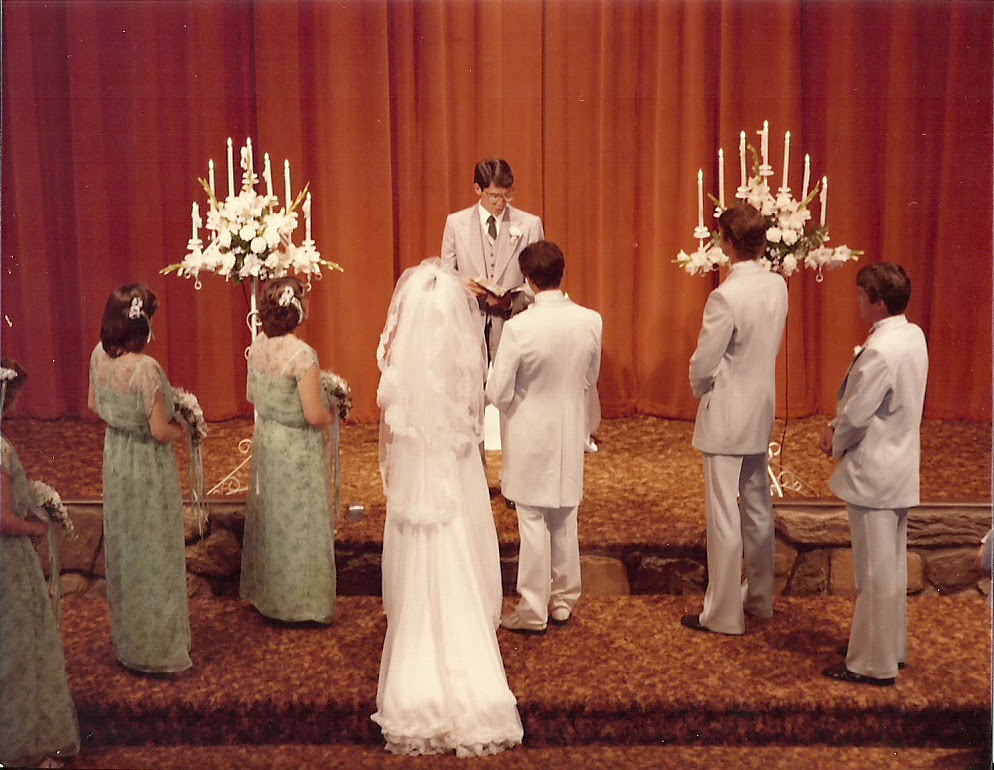
Hey everyone! I could use some help. My mom gave me her stack of wedding photos and asked me to edit them for her, make them look a little bit nicer and try to get rid of that rust color in the background. I have only worked on one photo so far, here is what I have done:
The Original
The Edit
I started with the Blueberry Glaze filter from thecoffeeshopblog.com. I felt like it made her face too dark, though, so I tried to adjust the white balance and it bleached out her dress. I also felt like the glaze got rid of a lot of the pretty detail from her dress and flowers. Let's just say I've spent the better part of 2 hours working on this photo so far, and I can't get it right. Is there anyone out there who can help me? Any actions you can think of to make this work right?
This post has been linked up in hopes that someone out there can help me :)
Edited: My cousin Rob gave me some suggestions, and I finally found the levels. Yeah, I feel dumb that I just found them. Oh well. Here's what I have so far:
I like this one MUCH better, so much more natural looking!
This post has been linked up in hopes that someone out there can help me :)
Edited: My cousin Rob gave me some suggestions, and I finally found the levels. Yeah, I feel dumb that I just found them. Oh well. Here's what I have so far:
I like this one MUCH better, so much more natural looking!
Saturday, June 4, 2011
Photoshop Actions
I have loved learning new techniques for Photoshop over the last couple of weeks. I got a little scared when my computer suddenly became a paperweight and wouldn't turn on at all (and if it did, it would shut itself off after 10 minutes!) Fortunately the hubby is pretty tech savvy and took out the video card and cleaned it all out from the dust. My computer is now without a video card, DVD/CD-ROM, and SD card reader. At this rate all we will have left by Christmas will be the box! But hey, it's working now, so awesome.
I have been learning a lot about the use of actions in Photoshop. I picked up a couple AWESOME ones for free from thecoffeeshopblog.com and I am so IN LOVE with them! I mostly use the vignette and the "Perfect Portrait," but I'm also exploring some others. Here are some fun before and after shots for you:
Actions used: same tutorial from Noel Culbertson, along with Perfect Portrait action from thecoffeeshopblog.com.
Same tutorial from Noel Culbertson and Vignette from thecoffeeshopblog.com
Cropped, Perfect Portrait mode from thecoffeeshopblog.com (I still need to adjust some levels on this one, but I love how it's coming out so far!)
Same tutorial from Noel Culbertson and using the Vignette action on thecoffeeshopblog.com
Thanks for checking out my photos today!
Sunday, May 22, 2011
Late Night Photoshopping
I know, I'm sorry, I keep posting about this. But, it's my blog and I'll do what I want.
Here are a couple more pictures I have been playing with in Photoshop tutorials I used in my previous posts.
I have been learning quite a bit from the tutorial, but now I'm also straying a bit on my own again and trying some new things. The picture with the baby and rabbit ears is my adorable niece. I always hate the yellow color that comes out when I take photos inside. I know I can adjust the white balance on the camera itself, but I always forget. I learned though, that if you decrease the saturation a little bit on the yellow curve and increase the brightness a little bit it makes the photo appear much less yellow and pink. And doesn't the Christmas tree photo look magical? Keep an eye out on Deviantly Domesticated for that same picture to end up in an upcoming challenge!
Okay, I promise to stop boring you with Photoshop stuff for a couple of days.
Here are a couple more pictures I have been playing with in Photoshop tutorials I used in my previous posts.
I have been learning quite a bit from the tutorial, but now I'm also straying a bit on my own again and trying some new things. The picture with the baby and rabbit ears is my adorable niece. I always hate the yellow color that comes out when I take photos inside. I know I can adjust the white balance on the camera itself, but I always forget. I learned though, that if you decrease the saturation a little bit on the yellow curve and increase the brightness a little bit it makes the photo appear much less yellow and pink. And doesn't the Christmas tree photo look magical? Keep an eye out on Deviantly Domesticated for that same picture to end up in an upcoming challenge!
Okay, I promise to stop boring you with Photoshop stuff for a couple of days.
Friday, May 20, 2011
More Photoshop Practice
Let's just say that I'm absolutely LOVING this tutorial from Noel Culbertson. Here are a couple of pictures I took today, the "befores" and "afters."
I love the color tones that are popping out from doing this. The kids' skin looks smoother, the sky looks bluer, and overall the effect is very nice. The dangerous thing, though, is that now I want to redo all of my Project Life album for this year by editing the photos first!
Subscribe to:
Posts (Atom)